Laser Engravers

Hi everyone, I purchased the new xtool F2 Ultra MOPA 60W laser. I have been looking at the xtool lasers for a couple of years and I think some of you might have one of the other F versions. I’m just looking for advice on how to get started with understanding what tweaking all the different settings does. I have been able to successfully engrave silver using the default settings, but am always looking to do better. I think this is going to be a big project for the winter, learning. Any advice from other laser owners? Thanks

Bernie

1 Like

Bernie, I’ve seen your work on etsy so I know you will master the laser in no time and be able to teach others.

Probably the biggest point to know is that there are many parameters and they interoperate, which can make learning very tedious. Example, 100% power at 100 mm/sec will burn about the same as 50% power at 50mm/sec. - less time over a spot means less burning, more time over a spot burns more. Logically, stick with one setting, vary only the other, to get to know what results you will get. MOPA frequency changes will also change the results so now you are juggling 3 variables that affect one another. Shorter focal length lenses project a tinier and thus hotter beam, so changing lenses will further affect your results, 4 variables. As was said in another post, K.I.S.S.- Keep It Simple.

xTool provides their own software, yes? It might help non-xTool users here to see a screen shot of the main menu, for non-xTool users to be able to help.

Consider downloading Lightburn just to see if it has features you might want that are not in the xTool software. You should be able to import work from other CAD programs into xTool if / when that might be of use.

You may want to cut through a piece, either to make a complete cutout, or to make a perforation cut (similar to CNC tabs). You will need a way to suspend the metal above the xTool platen so you don’t burn into that. Something like this would help:

https://www.amazon.com/INPAITOO-Marking-Machine-Fixture-Adjustable/dp/B0F9F58XKZ?crid=1YUSZWRXQ7GNG&dib=eyJ2IjoiMSJ9.TOE4G_20xUYQVVnf4TCl5X6oXsP00NB_l6RhM-GsUOK_j5Dp1anOMPrORhQmYLctiJPyr1lDyDxyKRu2RFjoF8ywcDgERvywF-ST43JEt9U6WonTGxNwPteTjMgimczMPepPSW5kJ4_mRRyuDgs1F3G2ex0IR6KXP3udzT8FLQGmBLUSRXsFNmEDkcDN0S8h3lC_7QhL9RlYVORQ0BwfO6Rl3EgVBa6nDxtz9WUmgx8.3u515xvcGALorvjlZUuFWQOhJLcARkUXAwcjYEyWl-0&dib_tag=se&keywords=sheet+metal+holder+for+lasers&qid=1753992595&s=hi&sprefix=sheet+metal+holder+for+lasers%2Ctools%2C144&sr=1-5

Prices vary for the exact same item depending on the seller, typical of Amazon.

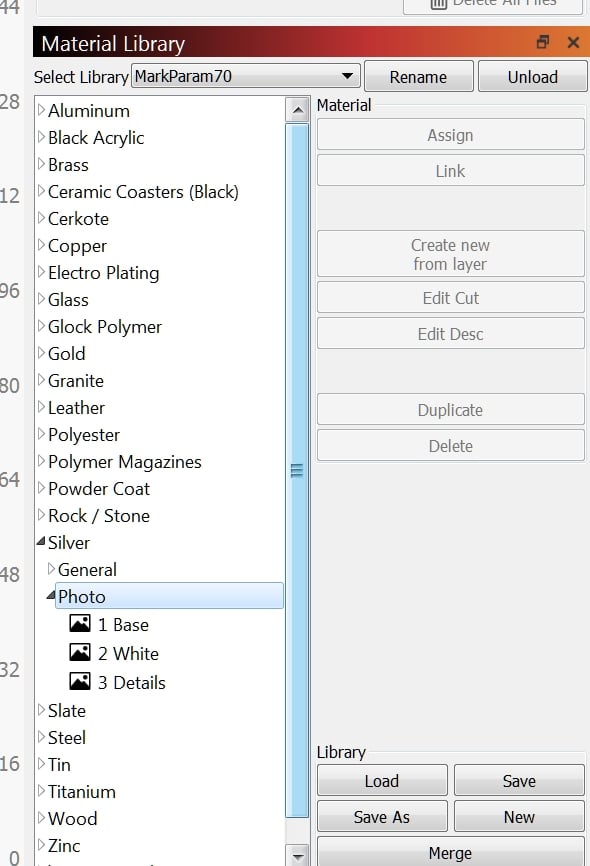
xTool software likely comes with preconfigured settings for various materials. There is a seller on etsy who sells files of many, many settings, possibly more than xTool provides. I ordered once, no delivery, had to complain to etsy to get the file. Ordered something else later, never got the goods, so if you order from that seller on etsy be prepared to follow up. Here’s a printscreen of my Material Library in Lightburn as an example:

These were all worked out by the seller on etsy and is well worth the cost, if you can get it.

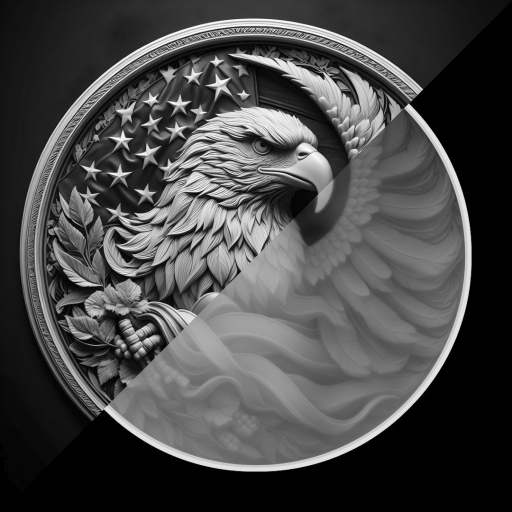
Last thing I will mention is 3D engraving. Technically you can’t do it. Most lasers are 2 axis only (X & Y). To get depth a mill would engrave in the Z axis as well (top down). But there are what are called depth maps, gradations of gray, over say 256 steps.

Following is an example. The depth map is on the lower right half, the engraved engraved results on the upper left. While it might almost look like it, you cannot get undercuts with depth map engraving.

Some software can burn depth map images and will skip over 0-black settings (leaving no burn, no cut) and can vary the burn depending on ‘blackness’ of each pixel, 1-256. If xTool software can burn depth map files you can do ‘coins’ and 3D engraving. if xTool software cannot and you want to, Lightburn can. If your machine is galvo you’d need a galvo license from Lightburn (one time $75 fee, I believe.) Bronze burns / engraves much more easily than silver so you can practice on bronze or brass, but will need to increase the power / decrease the cutting speed for silver, probably quite a bit.

Hope this helps. Have fun, share what you learn and what you make.
1 Like

Neil, thank you for such a thoughtful reply and your kind words. I will share as I learn more.
Bernie

1 Like

I was so thrilled to see your post about this! I scheduled a one on one in person meeting with someone from the xTool community (gotten from the xTool company that now offers actual people to talk to who use the products). I scheduled it as I am interested in getting one, but wanted to make sure these were real products, and that I was getting the right one for what I need, (not just YouTube bs that would break and then you’re stuck with the thing without support). I look forward to hearing about your success, trials and tribulations with it and will happily share what I learn.

Thank you also to neil_a3 for your reply as this helps me understand it as well.

OK, here is my first project. It isn’t too bad figuring out how to use the f2 ultra with the software that xtool provides. I also purchased a used foldio 360 and that is how I took this shot. Hopefully the link works.

You can put your cursor on the picture and move it around to see a 360 view. I was able to mark the inside of the ring as well as the outside.

Bernie

1 Like

How deep a cut did you make and what is it blackened with. I have been looking at the Ultra, but have never seen a finished piece, so thanks for the post…Rob

Hi Rob, I used black max to darken the engraved part. I’m not sure exactly how deep the engraving was as I engraved and then finished the front, so the profile changed a bit. When I was testing I was able to easily get 1mm deep and don’t have the settings anywhere near max. That C on the front took 30 seconds and the engraving on the back took 1min 30 seconds because the rotary attachment is the limiting item for speed. I will keep sharing as I learn more. I haven’t tried cutting out sheet yet, but that is something I am hoping will work well to get some lower priced earrings for my business. Feel free to reach out with any questions.
Bernie

I hope this helps in regard to the color of the engraving.

Some settings will produce black on a metal, other settings will produce a ‘gray’, which on silver is gray, on gold or brass would be tan (as in that pendant image I uploaded some days ago).

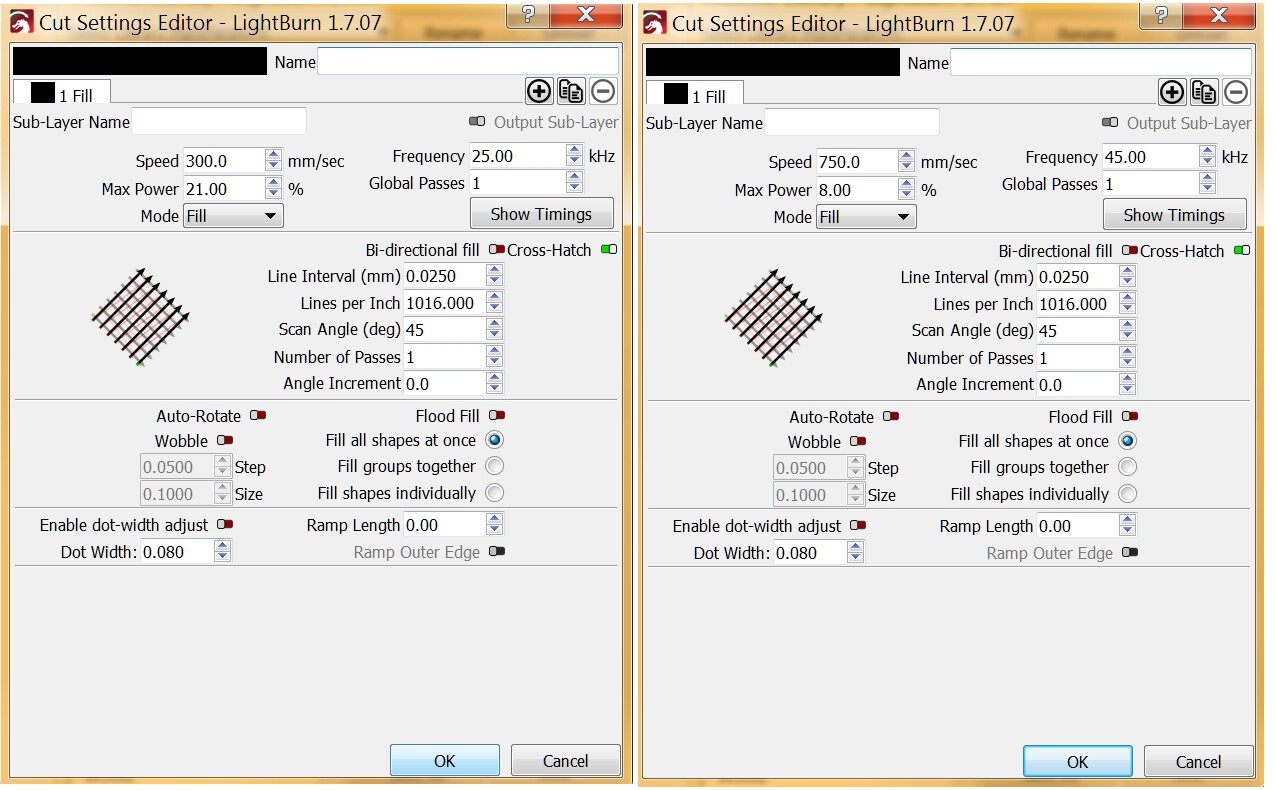
Here are 2 different setting profiles, first for black on silver, the second for ‘satin finish’ which I called ‘gray’.

The relative details are in the top (sub layer section) of each form. I included whole forms so people can see how many other settings there are. There are so many.

Three parameters are different between ‘black’ and ‘satin’.

It is far easier to buy the settings from an etsy shop than to try to work them out by trial & error, if xTool does not come with all the options of the purchased settings.

I burned a test fleur de lys on copper and for whatever reason got a mirror bright white! I can’t find an image of it, didn’t record the settings. If a machine is also ‘MOPA’ you can get colors, but they would oxidize off on any metal except stainless steel and titanium, so you’d need to use those metals for color.

In all cases of black/gray/color the finish is like a thin plating, so can be scratched or abraded off. Black max or resin enamel fills would be a lot more durable.

I hope this helps.

1 Like

So they came out with the ultra one month after I purchased the f2. I was so freaking angry. They should have let me trade in at that point because they knew that I wanted something that would engrave gold and silver good and it does not with the regular one. It will engrave it but it’s very shallow. Anyway for your question there are multitudes of groups that have an actual chat to them where people can ask questions and there’s a plethora of information so just look up your xtool and join the groups and introduce yourself and ask your questions. Everybody’s generally pretty awesome and there’s lots and lots of information in there. Also the company itself has its own reps that are actually in the groups as well that are very good about answering questions also

1 Like


I think if you zoom in on this picture you can get an idea of how deep you can engrave with the xtool f2 ultra. This was only 60% power with 15 passes and only took 30 seconds. I only engraved the letters. The outside was pressed, but it is just a test piece. I am really excited to get to know this machine more.
Bernie

2 Likes

It may just be the picture or my monitor, but is the surface purposefully dulled or blacken to cut down on reflection or just an unpolished piece of material that you had around. Regardless, thanks for sharing…Rob

Hi Rob, that was just a test piece, so I did not polish it at all. I use a sharpie to cut down the reflectance of the silver.
Bernie

Thanks…Rob